How to See What's Planned for Each Day
Last updated: 2026-03-20
Quick Answer
Wondering what's for dinner tonight? Family Values makes it easy to see exactly what's planned for any day of the week. Just open the Meal Planner at familyvalu.es, and the weekly calendar shows every meal organized by day and course -- breakfast, lunch, and dinner -- so you always know what's coming up.
Step-by-Step Walkthrough
-
Open the Meal Planner at /meal-planner in Family Values.
-
Look at the weekly calendar on the left side of the page. Each day from Monday to Sunday has its own clearly labeled section.
-
Find the day you're interested in. Each day is divided into three course sections: Breakfast, Lunch, and Dinner.
-
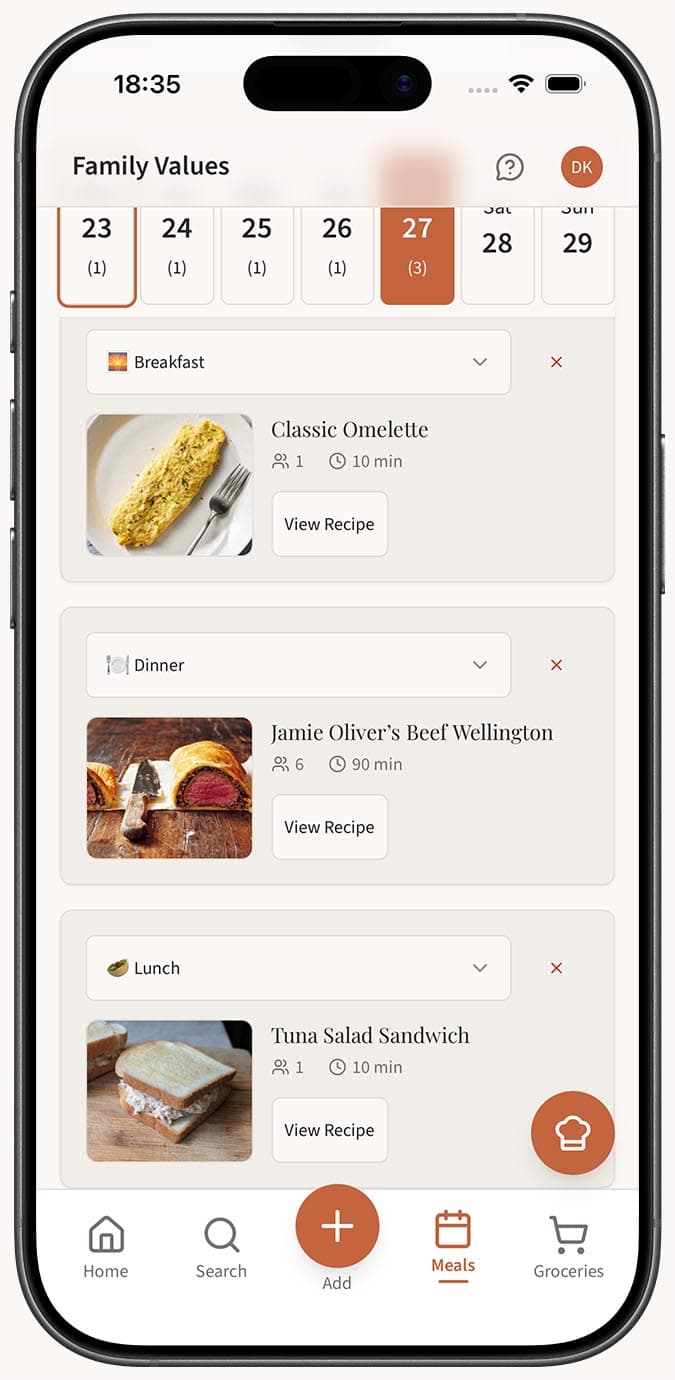
Review the meal cards under each course. Every planned meal shows the recipe name, cook time, and servings right on the card, so you get the essential info at a glance.
-
Navigate to a different week if the day you're looking for isn't in the current view. Use the left and right arrow buttons to move between weeks, or click "Today" to snap back to the current week.
-
Click on a meal card to open the full recipe. This takes you to the complete recipe page with all ingredients, step-by-step instructions, and any notes you've added.
-
Check the week summary at the top for a broader perspective. It shows the total number of meals, unique recipes, total servings, and combined cook time across the entire week.
Tips
- Make it a habit to check your meal plan each morning or the evening before. A quick glance tells you if you need to defrost anything or do any prep ahead of time.
- If a day has empty course slots, that just means you haven't planned those meals yet. You can add something on the fly by grabbing a recipe from the library.
- The cook time shown on each meal card helps you gauge how much kitchen time you need that day. If you see a 90-minute recipe on a busy weeknight, you still have time to swap it out.
- On mobile, each day stacks vertically in a scrollable list. Swipe or scroll to the day you need -- it's easy to find even on a small screen.
- Use the week summary to compare workload across weeks. If one week looks heavier than another, you can rebalance by swapping in simpler meals.
Related Questions
Frequently Asked Questions
Related Articles
How to Use the Weekly Meal Calendar
A walkthrough of the Family Values weekly meal calendar view, including navigation, day slots, course sections, and the week summary.
How to Plan Meals for the Week
Learn how to use the Family Values meal planner to organize breakfast, lunch, and dinner for the entire week in one simple view.