How to Save a Recipe from Instagram or Social Media
Last updated: 2026-03-20
Quick Answer
Found an amazing recipe scrolling through Instagram or TikTok? Don't let it disappear into your feed. Family Values gives you two reliable ways to save social media recipes into your personal collection at familyvalu.es -- either by sharing the post link or by screenshotting the recipe content.
Step-by-Step Walkthrough
Method 1: Share the Post Link (Webpage Tab)
-
Open the social media post containing the recipe.
-
Tap the share button and select "Copy Link" to copy the post URL to your clipboard.
-
Open the Magic AI Importer in Family Values and select the Webpage tab (the Globe icon).
-
Paste the copied link into the URL field.
-
Click the "Extract Recipe" button. The AI will pull the recipe details from the post's caption and any available metadata.
Method 2: Screenshot the Recipe (Image Tab)
-
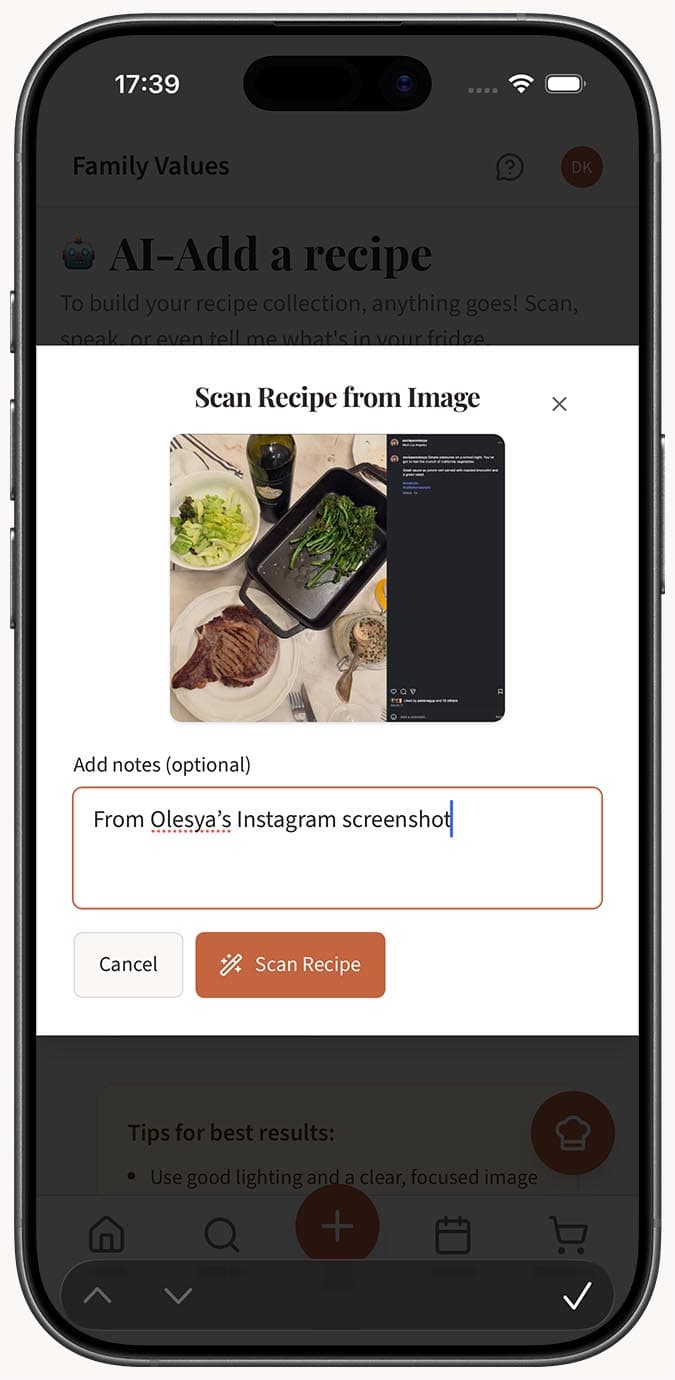
Screenshot the parts of the post that contain the recipe -- this might be the caption, a recipe card image, or text overlaid on the photo.
-
Open the Magic AI Importer and select the Image tab (the Camera icon).
-
Upload your screenshot by clicking the upload area or dragging and dropping it.
-
Add optional notes like "Recipe is in the caption text" if it helps clarify what the AI should focus on.
-
Click the "Scan Recipe" button.
After Either Method
- Review the extracted recipe. With autosave enabled, it saves directly to your collection. Otherwise, you'll see the recipe editor with all fields pre-filled for you to review and save.
Tips
- Method 1 (link) works best when the recipe is written out in the post caption. This is the fastest approach and usually captures everything.
- Method 2 (screenshot) works best when the recipe is displayed as an image, a carousel slide, or text overlaid on a video frame.
- For carousel posts with the recipe spread across multiple slides, screenshot each slide and import the one with the most complete recipe info. Then fill in any gaps in the editor.
- Instagram recipe posts often include the recipe in the caption below a long personal introduction. The AI is good at finding the actual recipe within all that text.
- For TikTok, many creators put the full recipe in the video description or comments. Copy the link and try the Webpage tab first.
- You can combine both methods: import via the link first, then check the original post to verify nothing was missed.
Related Questions
Frequently Asked Questions
Related Articles
How to Save a Recipe from a Website
Learn how to save any recipe from a website into Family Values using the Magic AI Importer's Webpage tab.
How to Save a Recipe from a Photo or Screenshot
Turn any recipe photo or screenshot into a digital recipe in Family Values using the Magic AI Importer's Image tab.
What Types of Files and Sources Can I Import Recipes From?
A complete guide to every recipe source the Family Values Magic AI Importer supports, from photos and voice to websites, PDFs, and JSON files.