How to Save a Recipe That Chef Val Creates
Last updated: 2026-03-20
Quick Answer
When Chef Val creates a recipe you love, you can save it to your Family Values collection with one tap. Look for the Save Recipe button in the chat, give it a name and category, and the recipe goes straight into your collection at familyvalu.es -- ready to cook from anytime.
Step-by-Step Walkthrough
-
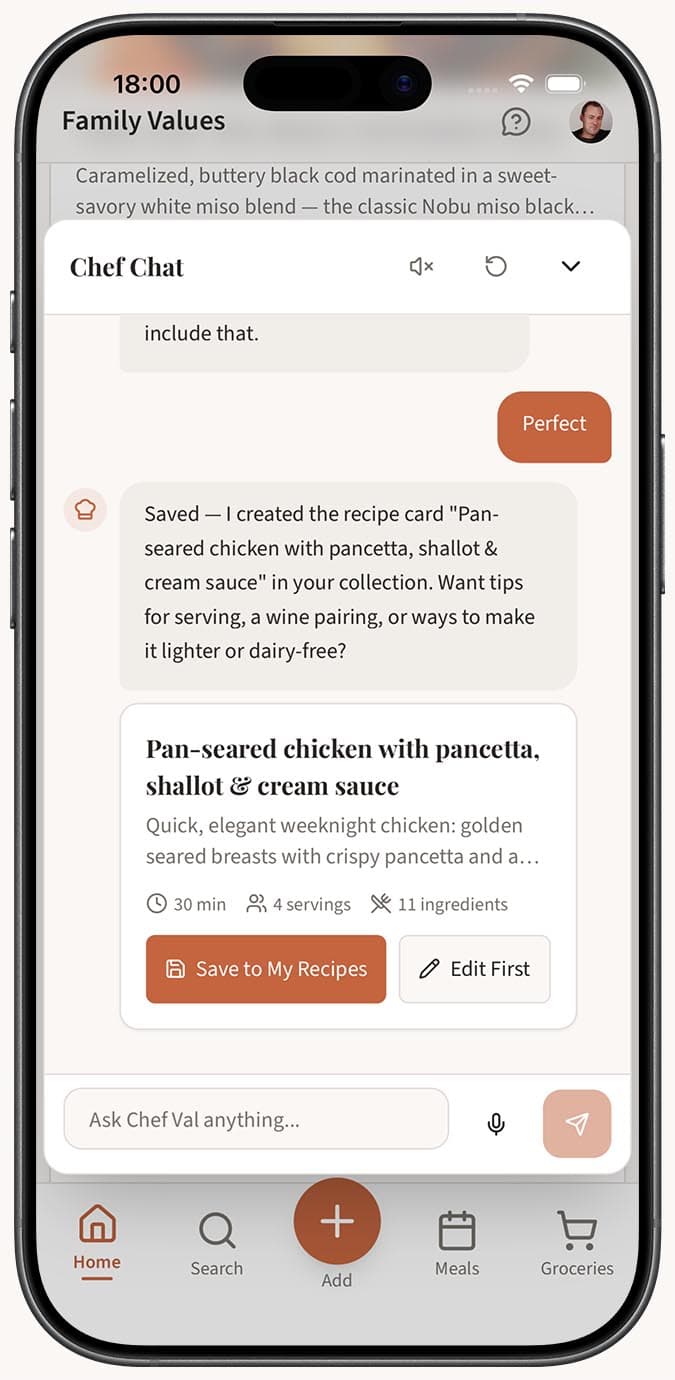
Ask Chef Val for a recipe in the chat. Once it responds with a complete recipe (including ingredients and instructions), you'll see action buttons below the response.
-
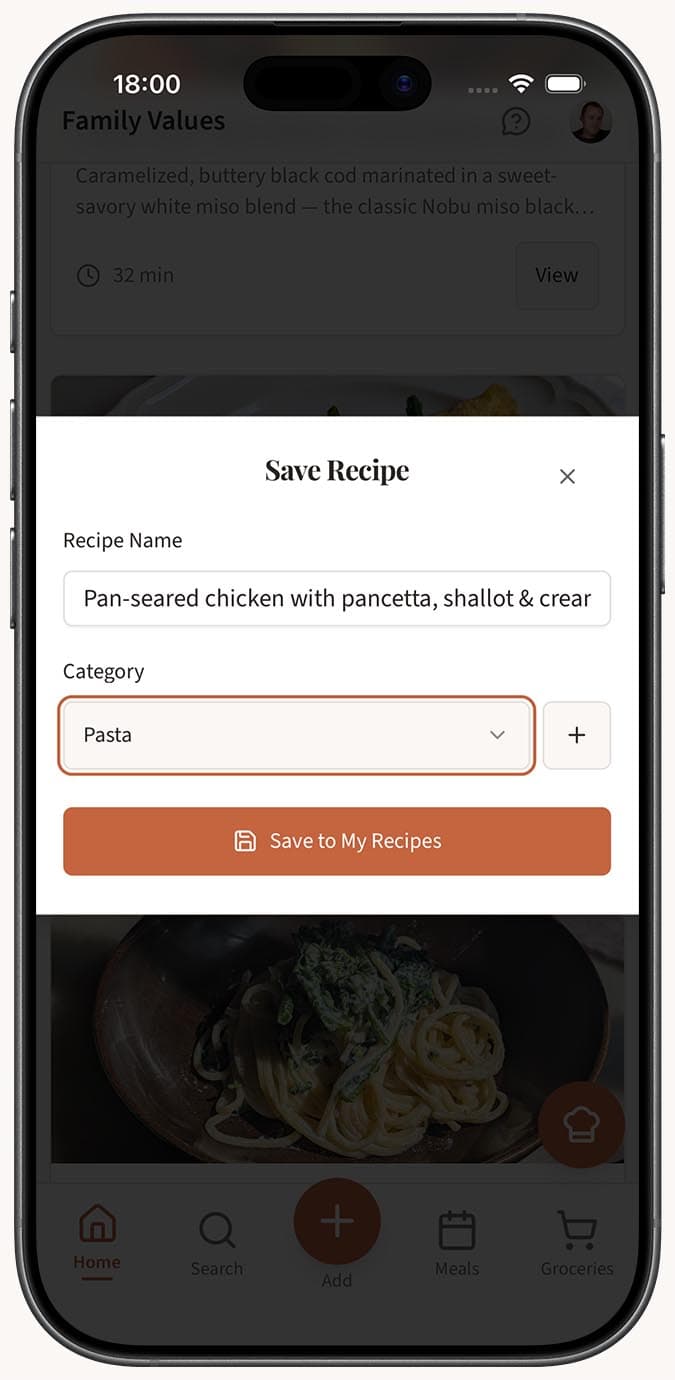
Tap the "Save Recipe" button. A save dialog will appear.
-
Fill in the recipe details in the save dialog:
- Recipe name -- pre-filled from the conversation, but you can change it.
- Category -- choose from your existing categories or leave it uncategorized.
- Visibility -- select Public (visible to others) or Private (only you can see it).
-
Tap Save to add the recipe to your collection. The recipe will appear in your recipe library with all the ingredients and instructions that Chef Val provided.
- Edit the recipe if you want to make changes. You can also tap the "Edit Recipe" button instead of Save Recipe to open the full recipe editor with all fields pre-filled. This lets you adjust ingredients, rewrite steps, add notes, set prep and cook times, or upload a photo before saving.
Tips
- Save the recipe as soon as you're happy with it. Chef Val only remembers the last 20 messages in a session, and clearing the chat or closing the app means the recipe is gone if you haven't saved it.
- If Chef Val gave you a recipe across multiple messages (for example, the ingredients in one message and the instructions in a follow-up), the save function captures the complete recipe from the conversation context.
- Use the Edit Recipe option when you want to add personal touches before saving. It's great for adding your own notes, adjusting serving sizes, or setting accurate prep and cook times.
- After saving, the recipe is fully editable just like any other recipe in your collection. You can update it anytime from the recipe detail page.
- Organize saved Chef Val recipes into categories right at save time so your collection stays tidy. If you generate a lot of recipes from chat, consider creating a category like "Chef Val Creations" to keep them grouped.
- Saved recipes from Chef Val work with all Family Values features -- add them to your meal planner, include them in shopping lists, or share them publicly.
Related Questions
Frequently Asked Questions
Related Articles
How to Use the AI Cooking Assistant (Chef Val)
Learn how to open and use Chef Val, the AI cooking assistant built into Family Values, for recipe ideas, cooking tips, and hands-free voice chat.
Can I Edit a Recipe After Importing It?
Learn how to edit any recipe in Family Values after importing it. Every field is fully editable, from ingredients and instructions to images and tags.