How to Change Your Preferred Measurement Units
Last updated: 2026-03-20
Quick Answer
Family Values lets you choose between Metric and Imperial measurements and between Celsius (C) and Fahrenheit (F) for temperatures. Change either setting anytime from the Settings page on familyvalu.es.
Step-by-Step Walkthrough
-
Sign in to your account. Open familyvalu.es and sign in.
-
Open the Settings page. Navigate to Settings from the main menu.
-
Find the measurement preferences. You'll see two separate options:
- Preferred Units -- choose between Metric and Imperial.
- Temperature -- choose between Celsius and Fahrenheit.
-
Select your preferences. Tap or click to switch to the system you prefer. You can mix and match -- for example, metric weights with Fahrenheit temperatures -- whatever feels natural for your cooking style.
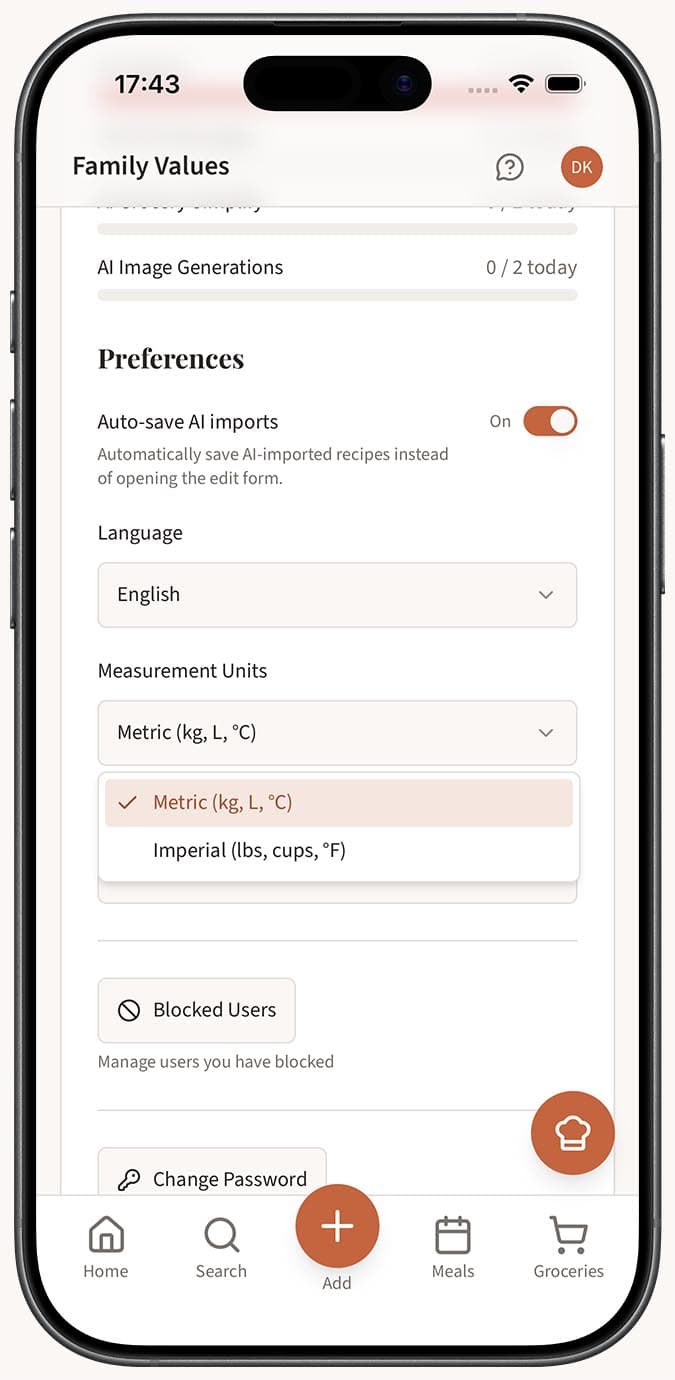
- Save your changes. Hit the save button. From this point on, recipes across the app will display in your chosen units.
Tips
- No wrong answer. Whether you grew up with cups and Fahrenheit or grams and Celsius, Family Values adapts to you. Pick what makes you reach for the measuring cups with confidence.
- Handy when travelling. If you're following a recipe from another country and want to see it in a different unit system, just flip the setting temporarily and switch back when you're done.
- Independent of language. Your unit preferences are completely separate from your language setting. You can use the app in Italian with imperial measurements if that's your thing.
- Set it once and forget it. Most people set their preferred units when they first set up their profile and never need to touch it again. But it's always there in Settings if you change your mind.
- Temperature matters for baking. Getting the oven temperature wrong can ruin a bake. Make sure your temperature preference matches the thermometer or oven dial you actually use in your kitchen.
Related Questions
Frequently Asked Questions
Related Articles
How to Set Up Your Profile
Personalize your Family Values profile with an avatar, public URL, preferred language, units, and custom recipe categories.
How to Change Your Preferred Language
Switch the Family Values app interface to any of 7 supported languages including English, French, Spanish, and more.