How to Change Your Preferred Language
Last updated: 2026-03-20
Quick Answer
You can change the language of your Family Values account at any time from the Settings page on familyvalu.es. Just pick your preferred language from the dropdown and save. The entire app interface will switch immediately.
Step-by-Step Walkthrough
-
Sign in to your account. Open familyvalu.es and sign in if you haven't already.
-
Go to Settings. Open the Settings page from the main navigation menu.
-
Find the language option. Look for the Preferred Language dropdown. It will show your current language selection.
-
Select your new language. Open the dropdown and choose from the seven available languages:
- English
- French (Fran\u00e7ais)
- Spanish (Espa\u00f1ol)
- Russian (\u0420\u0443\u0441\u0441\u043a\u0438\u0439)
- Chinese Simplified (\u4e2d\u6587)
- German (Deutsch)
- Italian (Italiano)
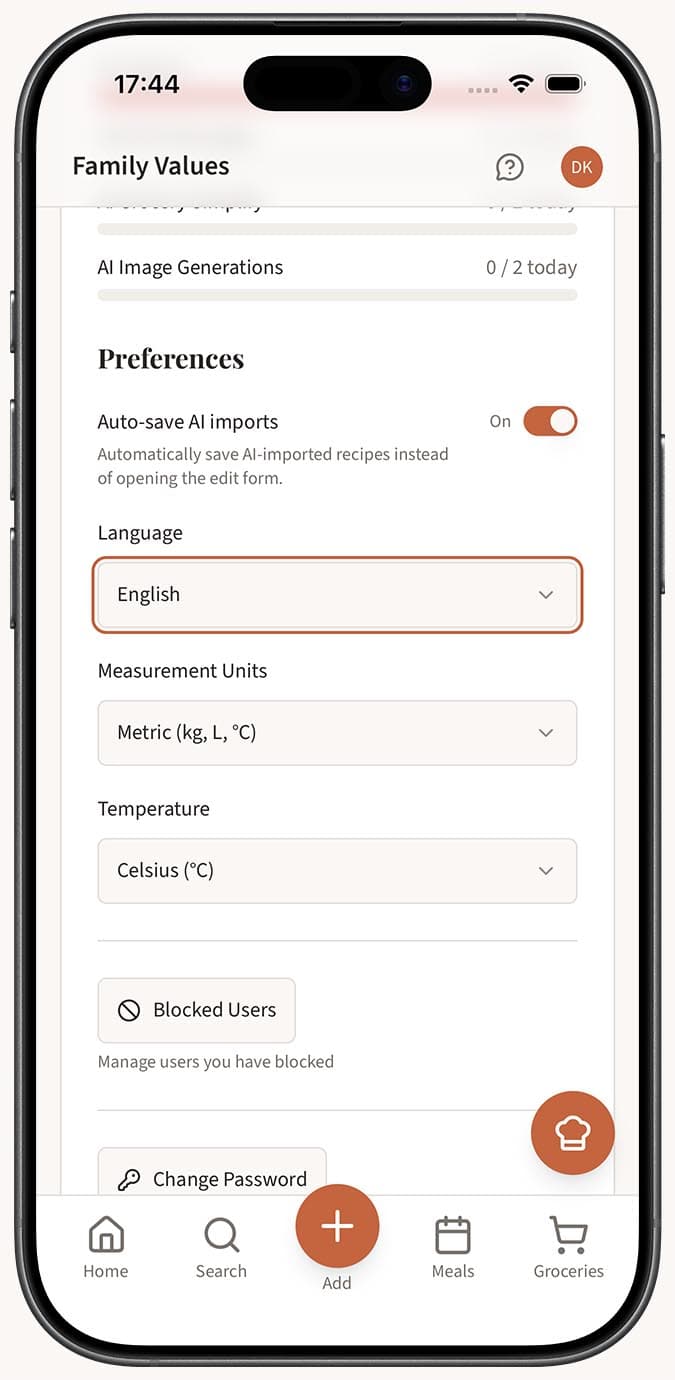
- Save your changes. Tap or click the save button. The app interface -- including navigation, buttons, labels, and system messages -- will update to your chosen language right away.
Tips
- Interface vs. recipe content. Changing your language updates the app's interface only. The text inside your saved recipes (titles, ingredients, instructions) will remain in whatever language they were originally entered or imported in.
- Great for multilingual households. If your family speaks multiple languages, each person can create their own account and set it to their preferred language independently.
- Try before you commit. Not sure which language feels most natural? Switch back and forth freely -- there's no limit on how often you can change it.
- AI import supports multiple languages too. The Magic AI Importer can recognize and import recipes written in many languages, regardless of your interface language setting. Check out our article on importing recipes in other languages for more details.
Related Questions
Frequently Asked Questions
Related Articles
What Languages Does Family Values Support?
Family Values supports 7 languages including English, French, Spanish, Russian, Chinese, German, and Italian.
How to Set Up Your Profile
Personalize your Family Values profile with an avatar, public URL, preferred language, units, and custom recipe categories.