So verwendest du den Voice-Chat mit Chef Val
Last updated: 2026-03-20
Kurze Antwort
Hände voller Mehl? Kein Problem. Family Values lässt dich per Stimme mit Chef Val sprechen. Tippe im Chat auf die Mikrofontaste, sprich deine Frage, und Chef Val antwortet -- sowohl als Text als auch optional laut per Text-to-Speech. Das ist der perfekte freihändige Assistent auf familyvalu.es, wenn du gerade mitten im Kochen bist.
Schritt-für-Schritt-Anleitung
-
Öffne Chef Val, indem du auf einer beliebigen Seite in Family Values unten rechts auf die Kochmützen-Schaltfläche tippst.
-
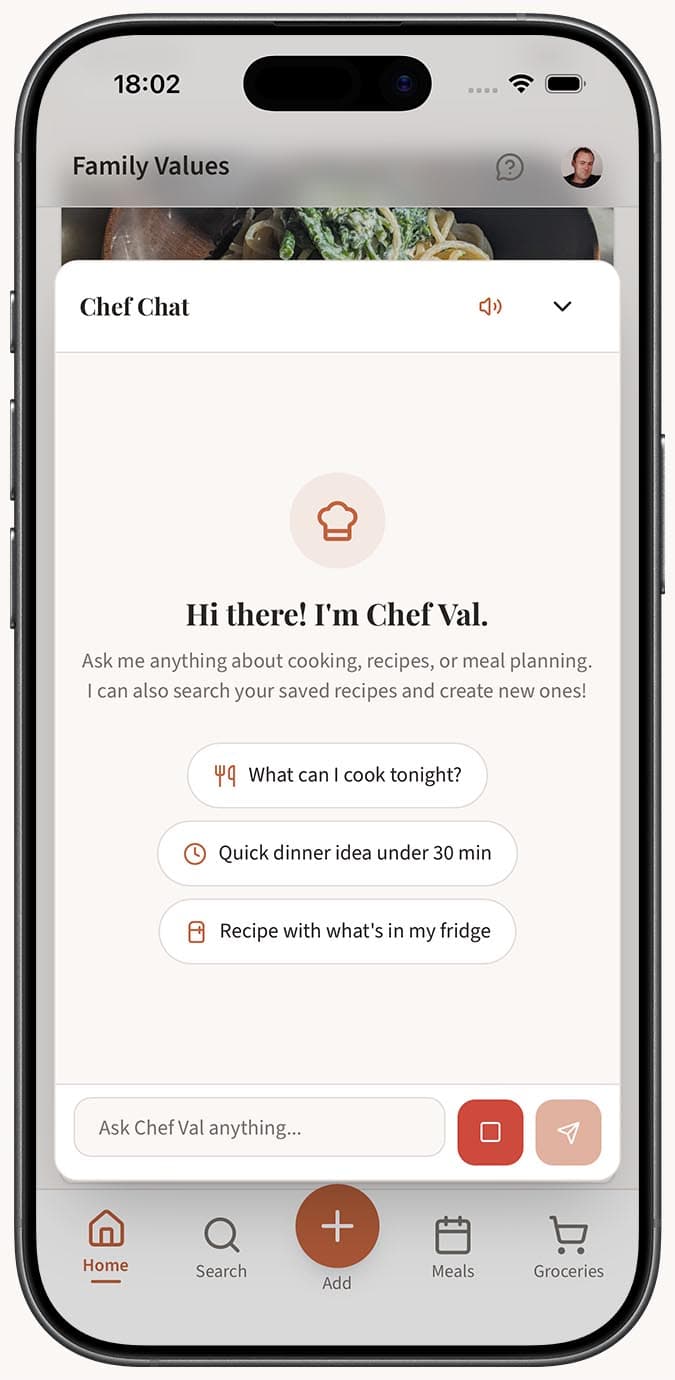
Tippe auf die Mikrofontaste neben dem Texteingabefeld unten im Chatfenster. Dein Browser fragt beim ersten Mal möglicherweise nach der Berechtigung für das Mikrofon -- erteile sie, um fortzufahren.
-
Sprich deine Frage klar und natürlich. Sage zum Beispiel: "Wie lange sollte ich ein ganzes Hähnchen bei 375 Grad braten?" oder "Wodurch kann ich Schlagsahne ersetzen?" Du musst dich nicht beeilen.
-
Tippe auf Senden, wenn du fertig gesprochen hast. Deine Sprachaufnahme wird zur Transkription gesendet, und der daraus entstehende Text erscheint im Chat als deine Nachricht.
-
Lies oder höre dir die Antwort von Chef Val an. Wenn du eine Sprachaufnahme startest, wird TTS (text-to-speech) automatisch aktiviert, sodass Chef Val seine Antwort laut vorliest. Du siehst den aktivierten TTS-Umschalter in der Chat-Kopfzeile.
-
Setze das Gespräch mit weiteren Sprachnachrichten fort oder wechsle jederzeit zum Tippen. Du kannst Sprach- und Texteingabe innerhalb derselben Unterhaltung frei kombinieren.
Tipps
- Voice-Chat ist ideal, wenn du aktiv kochst und nicht tippen kannst. Lass den Chat auf deinem Handy oder Tablet in der Nähe geöffnet und sprich deine Fragen einfach aus, sobald sie dir einfallen.
- Der TTS-Umschalter in der Chat-Kopfzeile steuert, ob Chef Val seine Antworten laut vorliest. Er wird automatisch eingeschaltet, wenn du die Sprachaufnahme zum ersten Mal verwendest, aber du kannst ihn auch ausschalten, wenn du lieber lesen möchtest.
- Sprich ganz natürlich -- du musst keine speziellen Befehle oder Aktivierungswörter verwenden. Stell deine Frage einfach so, wie du auch einem Freund in der Küche eine Frage stellen würdest.
- Deine Stimme wird von AssemblyAI transkribiert und als Text an Chef Val gesendet. Das bedeutet, dass Chef Val deine Frage mit derselben Intelligenz verarbeitet, egal ob du sie tippst oder sprichst.
- Wenn die Transkription nicht ganz stimmt, kannst du den Nachrichtentext vor dem Senden bearbeiten oder ihn einfach so senden -- Chef Val ist normalerweise klug genug, auch unvollkommene Transkriptionen zu verstehen.
- Voice-Chat funktioniert besonders gut für schnelle Fragen wie "Wie viele Esslöffel sind in einer Tasse?" oder "Ist mein Hähnchen bei 165 Grad gar?", wenn du sofort eine Antwort brauchst.
- Für längere Anfragen, etwa das Diktieren eines ganzen Rezepts, solltest du stattdessen den Voice-Tab des Magic AI Importer verwenden, der speziell für die Rezepteingabe entwickelt wurde.
Verwandte Fragen
Frequently Asked Questions
Related Articles
So verwendest du den AI-Kochassistenten (Chef Val)
Erfahre, wie du Chef Val, den in Family Values integrierten AI-Kochassistenten, öffnest und verwendest – für Rezeptideen, Kochtipps und freihändigen Sprachchat.
So fügst du ein Rezept hinzu, indem du es sprichst oder diktierst
Erfahre, wie du mit deiner Stimme ein Rezept in Family Values mithilfe des Magic AI Importer diktierst. Tippe einfach auf Aufnahme, sprich dein Rezept ein und lass die AI den Rest erledigen.