How to Make a Recipe Public So Others Can Find It
Last updated: 2026-03-20
Quick Answer
In Family Values, every recipe is private by default. To let others discover your recipe through search or your public profile on familyvalu.es, open the recipe form and toggle the Public switch on. Once public, the recipe appears in global search results and on your profile page.
Step-by-Step Walkthrough
- Open the recipe you want to make public. You can find it in your recipe collection.
- Tap Edit to open the recipe form. This is the same form you used when you first created or imported the recipe.
- Find the Public toggle. It is located in the recipe form fields. By default it is set to off (private).
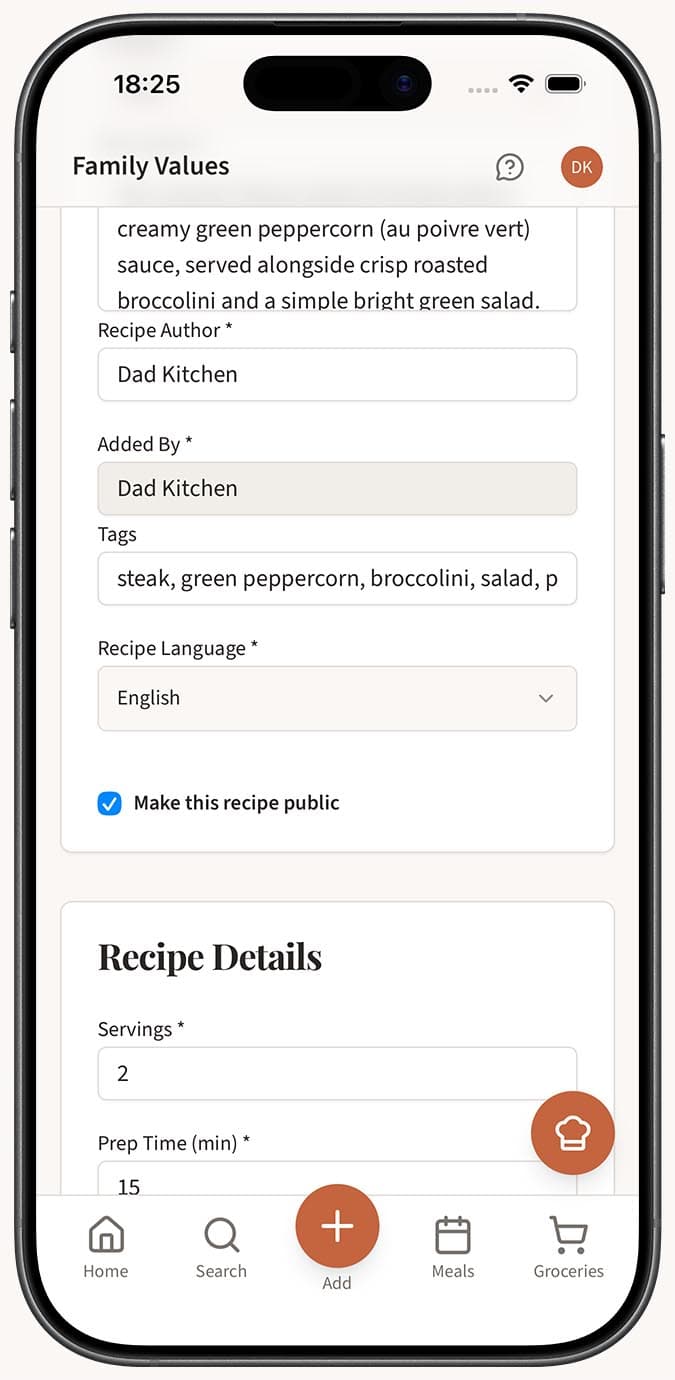
- Switch the toggle to on. The recipe is now marked as public.
- Save the recipe. Your changes take effect immediately. The recipe will now appear in global search results on Family Values and will be displayed on your public profile at
familyvalu.es/profile/your-name.
Tips
- Review before publishing. Once a recipe is public, anyone can find it. Make sure the title, ingredients, steps, and photos look the way you want them to.
- Bulk visibility is not available. You need to toggle each recipe individually. This is intentional so you stay in control of exactly which recipes are shared.
- Public recipes boost your profile. The more public recipes you have, the more discoverable your public profile becomes. Other home cooks can follow you and see your creations in their home feed.
- Reversible at any time. Changed your mind? Simply edit the recipe, toggle Public off, and save. The recipe will be removed from search and your public profile immediately.
- Sharing goes further with a link. Making a recipe public is the first step. You can also copy the recipe link and send it directly to friends and family.
Related Questions
Frequently Asked Questions
Related Articles
What's the Difference Between Public and Private Recipes?
Understand the difference between public and private recipes in Family Values, and learn how the visibility toggle affects who can see your recipes.
How to Share a Recipe with Someone
Learn how to share any public recipe from Family Values with friends and family using a simple link.
How to View Your Public Profile
Learn how to find and view your public profile on Family Values at familyvalu.es, and see what other users see when they visit it.