How to Find and Browse Other People's Recipes
Last updated: 2026-03-20
Quick Answer
Family Values has a global search that includes all public recipes shared by home cooks on the platform. Use the search feature on familyvalu.es to find recipes by keyword, browse results sorted by popularity, and visit user profiles to explore their full collections.
Step-by-Step Walkthrough
- Open the search feature in Family Values. You can access it from the main navigation.
- Enter a keyword or dish name. The search scans all public recipes across the platform, not just your own collection.
- Browse the results. Each result shows the recipe card with a photo, title, and the name of the home cook who shared it.
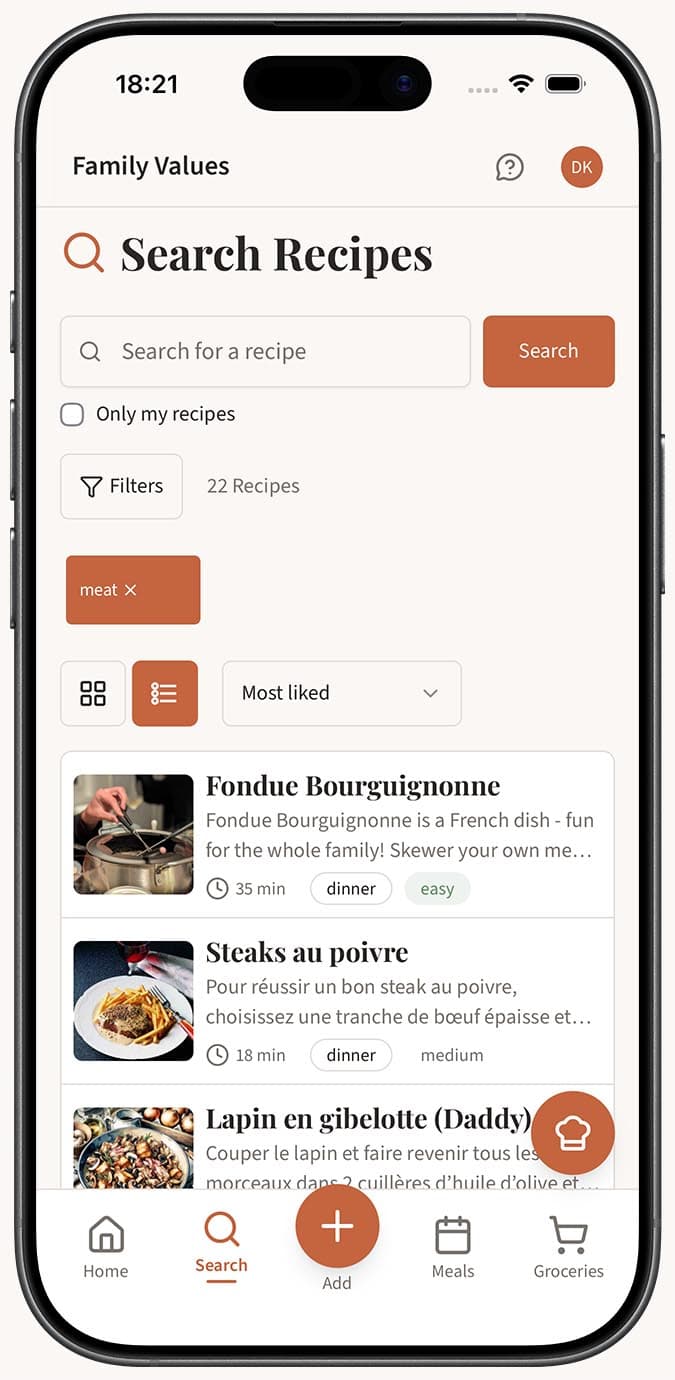
- Sort by "Most Liked" to surface the most popular recipes in the community. This is a great way to find tried-and-tested dishes that other home cooks have enjoyed.
- Tap a recipe to open the full detail page with ingredients, steps, and photos.
- Visit the cook's profile. From a recipe, you can navigate to the cook's public profile at
familyvalu.es/profile/their-nameto browse all of their public recipes displayed in a grid layout.
Tips
- Use the "Most Liked" sort option when you are looking for inspiration rather than a specific dish. The community's favorites are a great starting point.
- Follow cooks you discover. If you find someone whose recipes match your taste, follow them so their future recipes appear on your home page automatically.
- Like recipes to bookmark them. Tap the heart icon on any recipe you want to come back to. Liked recipes are easy to find later.
- Explore profiles for hidden gems. A cook might have dozens of public recipes. Visit their profile page to see the full grid rather than relying solely on search results.
- No account needed to view. If someone sends you a link to a public recipe, you can see it in your browser without signing up. Creating an account unlocks liking, following, and saving.
Related Questions
Frequently Asked Questions
Related Articles
How to Follow Other Home Cooks on Family Values
Learn how to follow other home cooks on Family Values so their latest public recipes show up in your home feed.
How to Search and Filter Your Recipes
Learn how to use the powerful search and filter tools in Family Values to find recipes by name, ingredient, category, course, difficulty, and more.
How to Like or Favorite a Recipe
Learn how to like recipes on Family Values using the heart icon, and how to find the most popular recipes on familyvalu.es.