How to Create and Manage Recipe Categories
Last updated: 2026-03-20
Quick Answer
Categories in Family Values are fully custom and managed from your Settings page at familyvalu.es. You can create new categories, rename existing ones, drag and drop to reorder them, and delete any you no longer need. You can also create categories on the fly while editing a recipe.
Step-by-Step Walkthrough
-
Go to the Settings page by tapping the settings icon in the navigation menu or visiting your account settings directly.
-
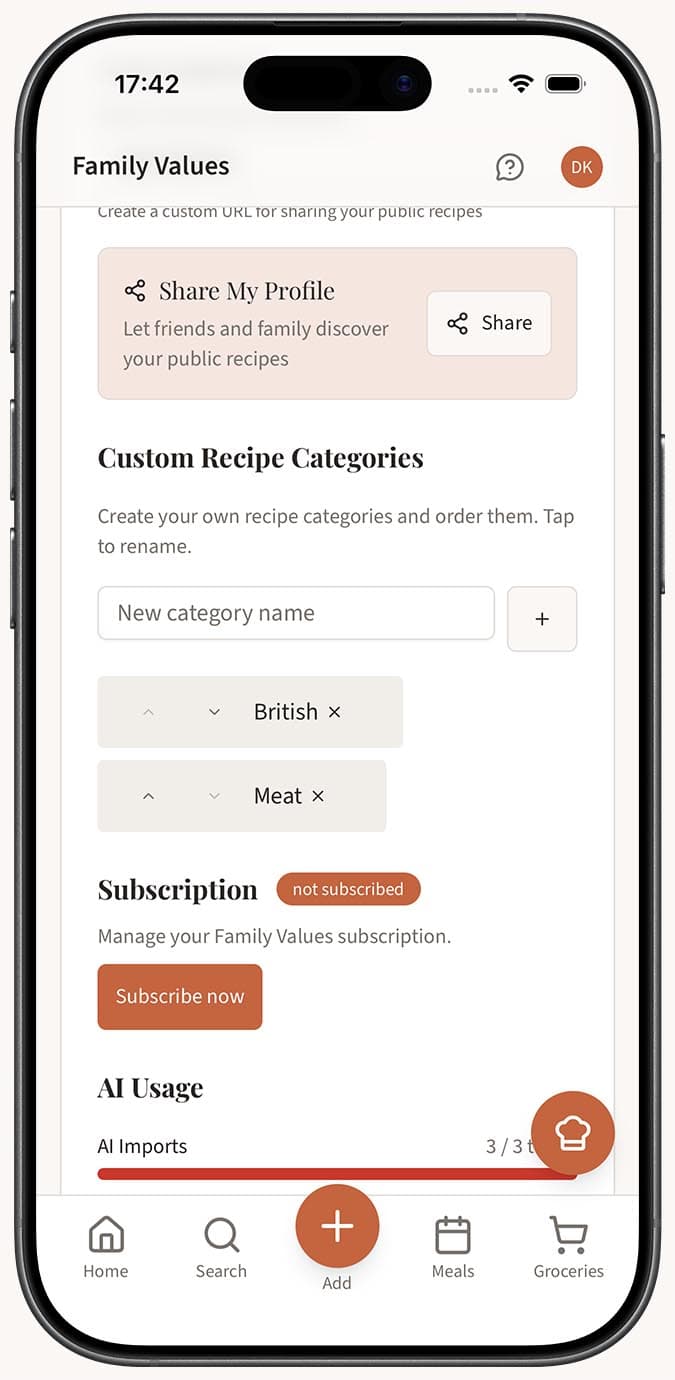
Find the Categories section. You'll see a list of all the categories you've created so far.
-
To create a new category, type a name into the input field and tap the Add button. The new category appears in your list immediately.
-
To reorder your categories, drag and drop them into your preferred order. Grab the handle on a category and move it up or down. The new order is saved automatically.
-
To rename or delete a category, use the controls next to each category name. Renaming updates the category across all recipes that use it. Deleting removes the category, and any recipes assigned to it become uncategorized.
- Alternatively, you can create a new category while editing any recipe. Open the Category dropdown in the recipe form, type a new name, and confirm. The category is created and assigned in one step.
Tips
- Start with a handful of broad categories and refine over time. You can always rename or split them as your collection grows.
- The order you set in Settings is the order that appears everywhere else -- in the recipe editor dropdown and in the search page filter. Put your most-used categories at the top.
- If you're migrating from another recipe app that used folders, think of categories as your new folder system. They serve the same purpose.
- Deleting a category does not delete any recipes. Those recipes simply become uncategorized and can be reassigned whenever you like.
- Keep category names concise. Short, clear names like "Soups," "Baking," or "Date Night" are easier to scan than long descriptions.
Related Questions
Frequently Asked Questions
Related Articles
How to Organize Recipes into Categories
Learn how to organize your recipe collection using custom categories in Family Values to keep everything neat and easy to find.
How to Edit or Update an Existing Recipe
Learn how to edit any recipe you've saved in Family Values, including updating ingredients, instructions, categories, images, and more.